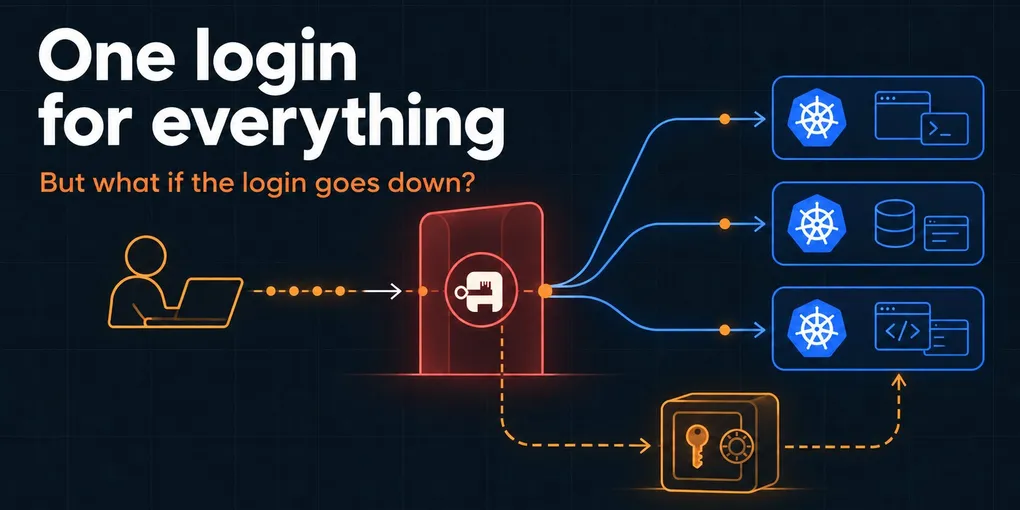
One login for everything, and a spare key under the mat
For a long time, giving someone access to our Kubernetes clusters went like this: create a ServiceAccount, write a Role and a RoleBinding for whatever that person needed, mint a token, wrap it in a kubeconfig, and send the whole thing over a safe channel. Then repeat for the next cluster. Then repeat for whoever is covering on-call for the next two weeks and just needs read access.
That was fine when the only person managing the clusters was me. It got less fine when colleagues and the people helping out with on-call started needing access too, and by the end one of those per-person RBAC files had become unwieldy.
And every one of those files was access I’d have to remember to take back. Even when the tokens were set to expire, keeping track of who still had what was a mental burden.
Renting our own front door
We’ve used hosted identity platforms like Auth0 for a while, and there was nothing wrong with them, technically. Logins worked, tokens were issued, the dashboards were pretty. But for our own internal tools, it always felt like renting the front door of our own building. Our users, our groups and our access policies lived in someone else’s product, configured through someone else’s UI, on someone else’s pricing page.
To be clear, Auth0 didn’t get kicked out. It still handles logins for the (white-label) deployments of the Trackpac and EdgePilot UIs, where the people signing in are our customers’ users, each deployment carries someone else’s branding, and a polished hosted login is exactly the job. Internal access is a different problem: a handful of people, a pile of admin tools, and a strong preference for keeping the keys in-house.
A good friend of mine (shout out to Rob) introduced me to Authentik: an open source identity provider you host yourself. It speaks OIDC, OAuth2, SAML and LDAP, which in practice means it can be the login screen for almost anything that has a “Sign in with…” button.
One more thing to run
So, naturally, I replaced a managed service with one more thing we have to run. On purpose, even. Infrastructure is my corner of the company, so this one was mine end to end: picking the approach, rolling it out across the clusters, defining the roles, and making sure there’s a way back in when it breaks.
One of our clusters is dedicated to shared services and already comes with a CloudNativePG Postgres cluster and secrets pulled from AWS SSM through External Secrets. Authentik slots into that like any other workload: one Helm chart, a database on the existing Postgres cluster, the SMTP provider we already use for password resets, and a route on the existing gateway. The marginal cost of “one more thing” was small. The benefit of owning our own identity layer was not.
Small isn’t zero, though. Authentik migrates its database on upgrade and doesn’t do downgrades, so upgrades get the most care. I read the release notes first, especially for feature releases, since those usually bring database migrations. Then the upgrade gets a staging run against a copy of our database, just to make sure logins still work. If something slips through anyway, the daily Postgres backups and WAL archiving allow a point-in-time recovery to just before the upgrade.
Everything behind one door
Authentik now runs there too, and almost every internal tool we have, on whichever cluster, asks it who you are:
- Harbor, our container registry
- Gatus, our status and monitoring dashboard
- Grafana instances that aren’t meant to be public
- Rocket.Chat, Chatwoot and Zammad for chat and support
- The Kubernetes API itself, on all our clusters
- And a bunch of other in-house management apps and services
Most of those are the same five-minute job: create an OAuth2/OIDC provider in Authentik, paste the client ID and secret into the app, point it at the issuer URL, map the groups claim. Boring in the best way.
One case was a bit different. Our internal developer docs are a static site, and like most of our static sites and small apps, it’s deployed on Cloudflare, because it’s easy, fast, and usually free. A single-page app can have a login screen of its own, but that only protects the API behind it. Our docs are just generated HTML, and every page of it is a file anyone can fetch directly. The gate has to sit in front of the files, not inside them, so Cloudflare Zero Trust does exactly that, using Authentik as its identity provider. Cloudflare holds the gate, Authentik decides who gets through.
I could serve those docs from an nginx pod on one of our own clusters just to say we host everything ourselves. That would be purity for its own sake. The part worth owning isn’t the web server. It’s the list of who gets in.
The one that actually mattered
Single sign-on for a chat app is nice. Single sign-on for kubectl is what made the whole thing worth it.
The nice part is that Kubernetes already knows how to do this.
The Kubernetes API server can validate OIDC tokens natively. You give it an issuer URL and a client ID, tell it which claim holds the username and which holds the groups, and from then on it trusts tokens signed by your identity provider. On our k3s clusters, that’s a handful of kube-apiserver-arg lines:
kube-apiserver-arg:
  - "oidc-issuer-url=https://auth.example.com/application/o/kubernetes/"
  - "oidc-client-id=<client-id>"
  - "oidc-username-claim=sub"
  - "oidc-username-prefix=authentik:"
  - "oidc-groups-claim=groups"
  - "oidc-groups-prefix=authentik:"
The prefixes look like decoration, but they’re not. Without them, a group in Authentik called system:masters would arrive at the API server as system:masters, which Kubernetes treats as “can do literally anything.” With the prefix, it becomes authentik:system:masters, which matches nothing. Nobody with Authentik admin access, including future me on a bad day, can accidentally create a group that silently grants cluster-admin.
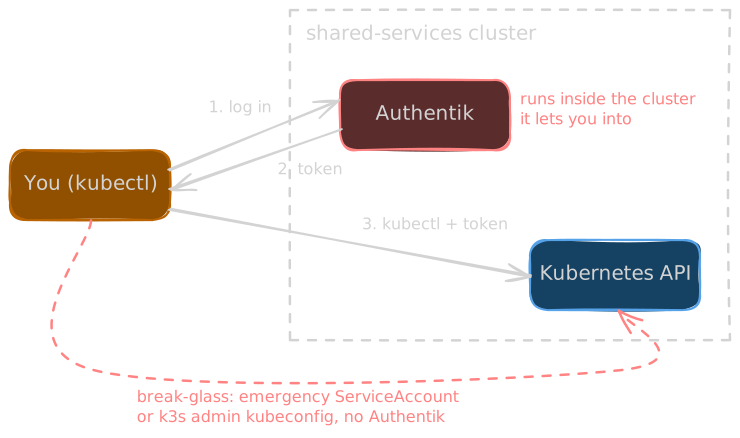
On the client side, kubelogin does the work. Run a kubectl command, a browser tab opens, you log in to Authentik, and the token lands back in your terminal. There is now one kubeconfig in our developer docs, with a context for each of our clusters, and it contains zero secrets. Anyone can download it. It’s useless until Authentik says who you are.
What you’re allowed to do then comes from your Authentik groups, bound once in RBAC:
| Authentik group | Kubernetes access |
|---|---|
k8s-readonly |
Cluster-wide view, plus read access to nodes, namespaces, volumes and CRDs |
k8s-<cluster>-maintainer |
Workload management, tailored to each cluster |
k8s-<cluster>-admin |
cluster-admin, when it’s genuinely needed |
The extra read access on k8s-readonly is there because the built-in view role doesn’t cover cluster-scoped resources, and you can’t debug much without seeing nodes and volumes.
Onboarding someone is now “add them to a group.” Offboarding is “disable the account,” in one place. Tokens already issued remain valid until they expire: for kubectl, that’s five minutes, after which the refresh to get a new one simply fails. Apps with their own sessions keep those until they expire, but nothing new gets issued, anywhere.
Once I’d verified everyone could access the clusters through Authentik, I deleted the old per-person ServiceAccounts and RoleBindings. Every old kubeconfig out there became a useless file. A new front door doesn’t mean much if the old keys still work.
Least privilege for a small team
The honest numbers: Authentik serves a little over ten people. Colleagues, plus a couple of external collaborators who have access to our Rocket.Chat.
That doesn’t sound like a crowd that needs an identity provider. But the number that matters isn’t people, it’s people x tools. Ten-odd people across chat, support, monitoring, a registry and several clusters is a lot of separate accounts to create, and a lot more to remember to remove. People help out with on-call for a few weeks and move on, and every one of them used to mean a fresh hand-rolled kubeconfig and a mental note to revoke it later.
Mental notes are not an access control system.
It also forces you to think about permissions as roles instead of people, which surfaces things you’d otherwise skip. That’s why the maintainer role is defined per cluster: a maintainer on one cluster needs different things than on another. On our shared-services cluster, for example, maintainers can create, edit and delete pods, deployments, jobs and config maps in the monitoring namespace, but they can’t list or read Secrets through the API. That’s a guardrail, not a vault: anyone who can deploy a pod can still mount a Secret into it. But it means the credentials that also live there, which maintainers don’t need, don’t show up in a casual kubectl get secret -o yaml, and for people we trust to deploy, that’s the right trade. When access is a file written for one specific person you trust, you don’t ask that question. When it’s a role anyone could be added to, you do.
The spare key under the mat
There’s one obvious problem with all of this, and it was part of the plan from day one, because the alternative is discovering it at 3 AM.
Authentik runs inside our shared-services cluster. Logging in to that cluster requires Authentik. If Authentik goes down, the only way to fix it is to log in to the cluster that hosts it, which requires Authentik.
That’s not a theoretical risk, either. Early on I underprovisioned the Authentik server, and it kept restarting. Nothing broke that anyone noticed, but it was a polite reminder that the login screen is just another pod. Doubling its CPU limit to a full core and raising memory from 1.5Gi to 2Gi made the restarts stop.
So there’s one deliberate exception: an emergency ServiceAccount, bound to cluster-admin, that doesn’t go through Authentik at all. There’s also the admin kubeconfig k3s generates when a cluster is created. Both are kept somewhere safe and boring, both have actually been tested, and both expire, so we rotate them 30 days before expiry. They exist for exactly one scenario: the identity provider is the thing that’s broken. It’s the spare key under the mat, except the mat is locked in a safe.
The takeaway
For us, the payoff of self-hosting our identity provider is simple: one place that knows exactly who can get into what, and one place to take that access away. Just don’t make your identity provider the only way into the cluster it runs on. Keep one way in that doesn’t depend on it, and hope you never need it.